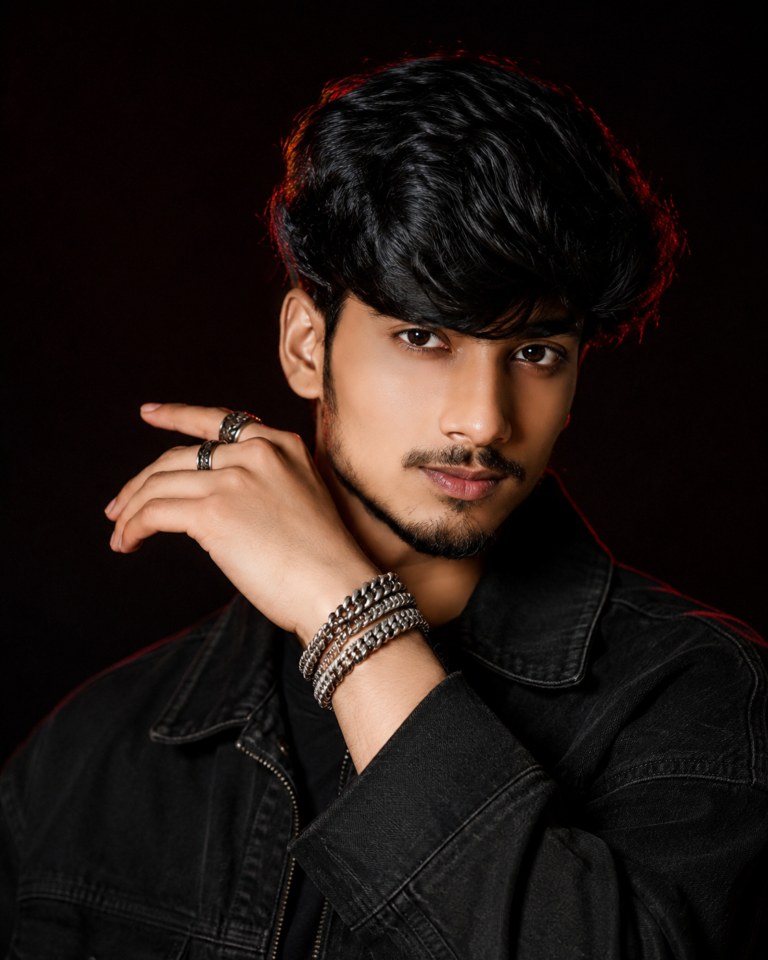
🔥 Ultra-Realistic AI Fashion Portrait Prompt – Create Cinematic Professional Photos
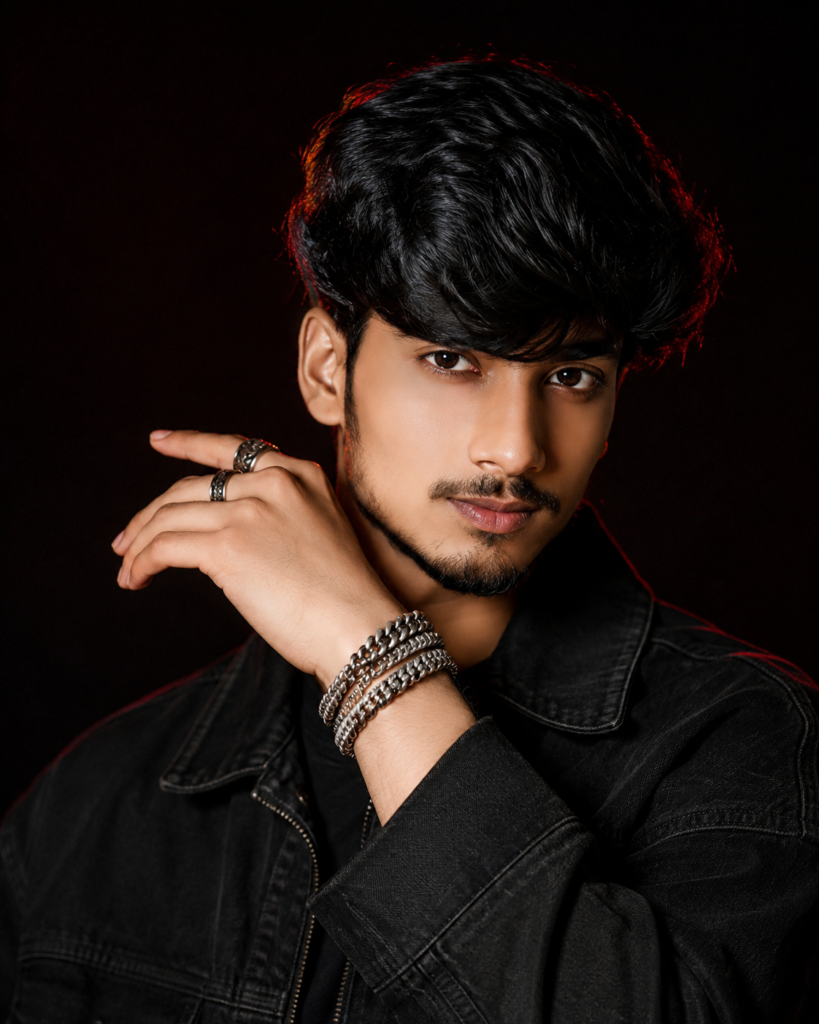
Create a cinematic luxury fashion portrait using your photos as face and body references, preserving your real identity, facial features and natural proportions with dramatic studio lighting, black styling and premium editorial aesthetics.
Full AI Prompt
Create a highly realistic, ultra-photorealistic luxury fashion portrait using ALL uploaded reference photos as identity and physique references for the SAME person.

IMPORTANT: Preserve the subject’s real identity and natural body proportions. Carefully analyze all reference images together before generating the final image. Keep the same facial structure, face shape, forehead, eyebrows, eyes, nose, lips, jawline, cheekbones, ears, skin tone, facial hair pattern, hairline, hairstyle characteristics, neck, shoulders, arms, hands, body build and overall natural proportions. Do not replace the face with a generic or different person. Do not unnecessarily change the subject’s physique, body shape, height-to-body proportions or facial features.

Recreate the overall visual style and composition of the provided inspiration image while using the uploaded person as the ONLY identity reference.

SUBJECT:
A young South Asian man with a confident, calm and slightly mysterious expression, looking directly into the camera. Head slightly tilted toward the camera. One hand is naturally raised across the lower face/cheek area, creating an elegant editorial pose. Fingers must be anatomically correct, naturally separated and realistically proportioned.

HAIR:
Preserve the subject’s recognizable hairstyle characteristics from the reference photos. Dark black hair with natural volume, textured individual strands, slightly tousled premium styling and realistic shine. Hair must look natural rather than artificial or wig-like.

OUTFIT:
Premium oversized black textured fashion jacket with a modern luxury-editorial silhouette, realistic fabric fibers, natural folds, stitching and subtle highlights. Minimal dark inner shirt underneath.

ACCESSORIES:
Multiple elegant silver rings on the visible fingers and layered metallic silver bracelets around the wrist. Jewelry should look physically realistic with accurate reflections, proportions and fine details.

POSE & COMPOSITION:
Tight chest-up fashion portrait. Subject positioned naturally in the frame, eye-level camera angle, confident relaxed posture, one hand crossing near the cheek. Maintain realistic shoulder width, arm thickness, hand size and body proportions based on the uploaded references.

LIGHTING:
Dramatic cinematic low-key studio lighting. A soft warm key light illuminates the face from the front/side. Subtle deep red rim lighting outlines the hair, jawline and shoulders. Strong but controlled contrast with natural skin highlights and shadows. Eyes should be extremely sharp and detailed.

BACKGROUND:
Minimal nearly-black studio background with subtle deep burgundy/red atmospheric tones. No distracting objects. Smooth cinematic background falloff and shallow depth of field.

CAMERA:
Professional luxury fashion photography, 85mm portrait lens look, approximately f/1.8–f/2.2, natural lens compression, shallow depth of field, sharp focus on the eyes and face, realistic perspective, premium editorial composition.

SKIN & DETAIL:
Natural realistic skin texture with visible but subtle pores and authentic facial details. Professional retouching without plastic or overly smooth skin. Preserve natural facial hair and small realistic imperfections.

COLOR GRADING:
Deep blacks, warm natural skin tones, subtle burgundy highlights, controlled cinematic contrast, rich shadows, realistic highlights, premium magazine color grading.

FINAL QUALITY:
Ultra-photorealistic, high-end fashion magazine photography, cinematic portrait, physically accurate lighting, realistic anatomy, realistic hands, detailed hair strands, realistic fabric texture, realistic jewelry reflections, HDR-quality dynamic range, extremely clean details, professional studio photography, 8K-quality appearance.

IDENTITY PRIORITY:
The uploaded reference photos are the highest priority for identity and physique. If the inspiration style conflicts with the reference person’s actual appearance, preserve the reference person’s identity and natural proportions. Change only the pose, clothing, lighting, background, styling and photographic aesthetic required by the prompt.

NEGATIVE PROMPT:
different person, changed identity, face swap, generic face, celebrity face, altered facial structure, changed nose, changed eyes, changed lips, changed jawline, excessive beautification, feminized features, unrealistic skin, plastic skin, waxy face, beauty filter, excessive smoothing, distorted face, asymmetrical eyes, deformed hands, extra fingers, missing fingers, fused fingers, malformed wrists, unrealistic arms, incorrect body proportions, oversized hands, tiny hands, distorted shoulders, unnatural pose, fake hair, wig-like hair, warped clothing, malformed jewelry, CGI, 3D render, cartoon, anime, illustration, blurry eyes, low resolution, excessive HDR, oversharpening, noise, artifacts, text, watermark, logo.
Negative Prompt
different person, changed identity, face swap, generic face, celebrity face, altered facial structure, changed nose, changed eyes, changed lips, changed jawline, excessive beautification, feminized features, unrealistic skin, plastic skin, waxy face, beauty filter, excessive smoothing, distorted face, asymmetrical eyes, deformed hands, extra fingers, missing fingers, fused fingers, malformed wrists, unrealistic arms, incorrect body proportions, oversized hands, tiny hands, distorted shoulders, unnatural pose, fake hair, wig-like hair, warped clothing, malformed jewelry, CGI, 3D render, cartoon, anime, illustration, blurry eyes, low resolution, excessive HDR, oversharpening, noise, artifacts, text, watermark, logo
How To Use
Prompt Tips
🔥 Ultra-Realistic AI Fashion Portrait Prompt – Create Cinematic Professional Photos
Want to transform your ordinary photos into a professional AI fashion portrait? This ultra-realistic AI fashion portrait prompt is designed to create cinematic, high-end editorial-style photos while keeping your original facial identity and natural body proportions.
By using multiple reference photos, you can guide the AI to maintain your face, hairstyle, skin tone, physique, and recognizable features while changing the outfit, pose, lighting, background, and overall photography style.
✨ What This AI Fashion Portrait Prompt Can Do
This professional AI portrait prompt is designed to help you create:
- Ultra-realistic fashion portraits
- Cinematic studio photographs
- Professional male portraits
- Luxury editorial-style photos
- AI photoshoot images
- Social media profile pictures
- Instagram-ready fashion photos
- Personal branding portraits
- High-end magazine-style photography
The prompt specifically prioritizes facial identity and natural body proportions. The final result can still vary depending on the AI image generator, reference images, and settings you use.
📸 How Many Reference Photos Should You Upload?
For the best results, upload 3–5 clear photos of yourself.
- A clear front-facing portrait
- A slightly angled face photo
- A full-body photo
- A natural outdoor photo
- Another recent photo showing your hairstyle and facial features clearly
Avoid heavily filtered, blurry, extremely dark, or very old photos. Clear and recent references usually give the image generator more useful visual information.
🎨 Full AI Fashion Portrait Prompt
Copy the prompt below and use it with your preferred AI image generator. If your tool supports reference images, upload your photos before generating the image.
Main PromptCreate a highly realistic, ultra-photorealistic luxury fashion portrait using ALL uploaded reference photos as identity and physique references for the SAME person.
Carefully analyze all reference images together and preserve the subject's real facial identity, facial structure, face shape, forehead, eyebrows, eyes, nose, lips, jawline, cheekbones, ears, natural skin tone, facial hair pattern, hairline, hairstyle characteristics, neck, shoulders, arms, hands, body build and overall natural proportions.
Do not replace the subject with a different or generic person. Do not unnecessarily modify the face, physique, body proportions, skin tone or recognizable features.
Recreate a sophisticated high-end fashion editorial portrait inspired by the target composition while using the uploaded person as the ONLY identity reference.
The subject is a young South Asian man looking directly toward the camera with a calm, confident and subtly mysterious expression. His head is slightly tilted toward the camera. One hand is naturally raised across the lower face and cheek area in an elegant editorial pose. Fingers must be anatomically correct, naturally separated and realistically proportioned.
Preserve the subject's recognizable hairstyle while giving it a refined fashion-editorial finish: dark black hair, natural volume, detailed individual strands, slightly tousled styling and realistic subtle shine.
Dress the subject in a premium oversized black textured fashion jacket with a modern luxury-editorial silhouette. Include realistic fabric fibers, natural folds, stitching and subtle highlights. Use a minimal dark shirt underneath.
Add tasteful silver rings on the visible fingers and layered metallic silver bracelets around the wrist. Jewelry must have realistic proportions, fine details and physically accurate reflections.
Use dramatic cinematic low-key studio lighting. A soft warm key light illuminates the face from the front/side while a subtle deep burgundy-red rim light outlines the hair, jawline and shoulders. Maintain strong but controlled contrast with realistic highlights and shadows.
Use a minimal nearly-black studio background with subtle deep burgundy/red atmospheric tones. Keep the background clean and uncluttered with smooth cinematic falloff.
Composition: tight chest-up fashion portrait, natural shoulder and body proportions based on the reference photos, eye-level camera angle, professional 85mm portrait-lens look, approximately f/1.8–f/2.2, shallow depth of field, realistic lens compression and sharp focus on the eyes.
Preserve natural skin texture, subtle pores, authentic facial details and natural facial hair. Use professional retouching without plastic-looking skin or excessive beauty filters.
Color grading should feature deep blacks, warm natural skin tones, subtle burgundy highlights, controlled cinematic contrast, rich shadows and realistic highlights.
Final result: premium luxury fashion magazine photography, cinematic portrait, ultra-photorealistic, physically accurate lighting, realistic anatomy, realistic hands, detailed hair strands, realistic fabric texture, realistic jewelry reflections, high dynamic range, extremely clean details and 8K-quality appearance.
Identity accuracy is the highest priority. If the inspiration style conflicts with the subject's actual appearance, preserve the uploaded person's identity and natural proportions. Change only the pose, clothing, lighting, background, styling and photographic aesthetic required by the prompt.🚫 Negative Prompt
Use this negative prompt whenever your AI image generator supports negative prompts:
different person, changed identity, face swap, generic face, celebrity face, altered facial structure, changed nose, changed eyes, changed lips, changed jawline, excessive beautification, feminized features, unrealistic skin, plastic skin, waxy face, beauty filter, excessive smoothing, distorted face, asymmetrical eyes, deformed hands, extra fingers, missing fingers, fused fingers, malformed wrists, unrealistic arms, incorrect body proportions, oversized hands, tiny hands, distorted shoulders, unnatural pose, fake hair, wig-like hair, warped clothing, malformed jewelry, CGI, 3D render, cartoon, anime, illustration, blurry eyes, low resolution, excessive HDR, oversharpening, noise, artifacts, text, watermark, logo🛠️ Recommended Settings
| Setting | Recommended |
|---|---|
| Aspect Ratio | 4:5 |
| Style | Photorealistic |
| Quality | High / Maximum |
| Reference Images | 3–5 |
| Camera Look | 85mm Portrait |
| Depth of Field | Shallow |
| Lighting | Cinematic / Low-key |
| Composition | Chest-up Portrait |
For Instagram Stories, Reels, and other full-screen vertical content, you can also use a 9:16 aspect ratio.
💡 Tips for Better AI Portrait Results
1. Use Clear Reference Photos
High-quality photos with good lighting generally provide better identity references than blurry or heavily compressed images.
2. Use Multiple Angles
Include front-facing and slightly angled photos so the AI has more information about your facial structure.
3. Include a Full-Body Reference
If maintaining your natural physique and body proportions is important, include at least one clear full-body photo.
4. Avoid Heavy Filters
Beauty filters can change facial proportions and make identity preservation more difficult.
5. Keep Your References Recent
Use recent photos that accurately represent your current hairstyle, facial hair, and overall appearance.
6. Don’t Over-Retouch the Result
A professional portrait should still have realistic skin texture. Excessive smoothing can make an AI-generated image look artificial.
👤 How to Preserve Your Face More Accurately
If the generated image doesn’t look enough like you, try uploading additional clear reference photos.
You can also strengthen the identity instruction by using:
The uploaded reference photos have the highest priority for facial identity. Do not redesign or replace the person’s face.
Avoid asking the AI to dramatically change your facial structure at the same time as requesting maximum identity consistency.
📱 Best Uses for This AI Portrait Prompt
- Instagram profile photos
- Social media posts
- Creator profiles
- Personal branding
- Portfolio images
- Fashion inspiration
- AI photography experiments
- Professional-looking profile pictures
- Cinematic social media content
❓ Frequently Asked Questions
Can I use multiple photos as references?
Yes. Using several clear photos can help the AI better understand your facial features, hairstyle, and natural proportions.
Can this prompt preserve my face?
The prompt is specifically designed to prioritize identity preservation. However, results depend on the capabilities of the AI image generator and the quality of your reference photos.
Can I change the outfit?
Yes. Replace the black fashion jacket instructions with your preferred outfit, such as a suit, denim jacket, streetwear, traditional clothing, or another fashion style.
Can I change the background?
Absolutely. You can replace the dark studio background with a city at night, luxury interior, nature, rooftop, beach, street, or another environment.
What aspect ratio is best?
For a fashion portrait, 4:5 is a strong starting point. Use 9:16 when creating vertical content for Stories or Reels.
Why does the AI sometimes change my face?
AI image generators may interpret reference images differently. Using several clear, recent photos and explicitly prioritizing identity can improve consistency.
🚀 Final Thoughts
A good AI fashion portrait prompt is more than simply describing clothing and lighting. For realistic results, the prompt should clearly define the subject’s identity, body proportions, pose, camera perspective, lighting, environment, and photographic style.
Use your reference photos carefully, keep the identity instructions strong, and experiment with different poses and fashion styles to create professional-looking AI portraits.